Feature flags for beta programs and early access
Ship the beta code invisibly, opt testers in, hand-pick early access, and expand the cohort from the dashboard. The flag decides who is in the beta; your feedback and analytics tools own what they think.
Last updated:
A beta program gives a subset of users early access to a feature so you can learn from real usage before a full launch. A feature flag is a clean way to control who is in that subset. You ship the beta code to production with the flag off, then a targeting rule serves it to a beta cohort: users who opted in, a segment you define, or a few named early testers. Because the cohort lives in configuration, you widen the beta, add a design partner, or end it entirely as a dashboard change rather than a deploy. What a flag does not do is gather what testers think or measure how they use the feature. Feedback lives in a feedback tool, and cohort behavior lives in your analytics stack. The flag owns the access decision; those tools own the learning. For the mechanics, see how targeting rules and segments work.
Why run a beta program behind a flag?
Four reasons teams reach for a flag when they want a controlled early-access group.
-
1
Ship the code before the launch
The beta feature can merge to main and deploy to production while the flag keeps it off for everyone. You decouple the deploy from the reveal, so the code is in place and tested in production long before you open the beta to a single user.
-
2
Change the cohort without a deploy
Who is in the beta lives in a targeting rule, so adding a customer, opening opt-in to everyone, or closing the beta is a dashboard edit. The application code that asks whether the beta is on for this user never changes.
-
3
Grow it in steps, keep it sticky
Start with a few design partners, then stack a percentage rollout to widen the beta as confidence grows. Sticky bucketing keeps the testers already in the beta in it, so their experience stays consistent while new users are added.
-
4
Roll back in seconds if it breaks
A beta is unfinished by definition, so things go wrong. Flip the flag off and every SDK serves the current experience within a second or two, fleet-wide, with no rebuild and no scramble to revert a deploy.
What a beta program needs, and which half a flag covers
A beta has an access side and a learning side. Feature flags own the access side completely. The learning side stays with the feedback and analytics tools you already run.
| Part | Where it comes from | What it covers |
|---|---|---|
| Who is in the beta | The feature flag | A targeting rule serves the beta variation to a "Beta users" segment, to accounts that opted in, or to hand-picked testers. Everyone else falls through to the current experience, so shipping the beta code does not expose it. |
| Hand-picked early testers | The feature flag | Target a specific user or organization id above the cohort rule to give a design partner access before anyone else, or to hold one account back, without a code change. |
| Whether a user opted in | Your app, or the dashboard | For a self-serve beta, your product stores the choice when a user clicks "join the beta" and passes it as an attribute the flag reads. For a small curated beta, skip the storage and manage membership as a segment or per-user targeting in the dashboard. |
| Feedback and bug reports | Your feedback tool | Collecting what testers think, through surveys, an in-app widget, or a support channel, is a job for a feedback or product-research tool. A flag decides who is in the beta; it does not gather their responses. |
| Analytics on beta usage | Your analytics stack | Measuring how the beta cohort behaves, through funnels, retention, or session replay, belongs to your analytics tool. The flag can emit an exposure event marking who saw the beta, but it does not chart the results. |
That division is the whole mental model. The flag guarantees a fast, consistent answer to "is this user in the beta". What they think of it, and what the usage data says, are questions your feedback and analytics tools answer. Running a beta by segment targeting on a cohort is the same rule machinery a targeted rollout uses, pointed at your testers instead of a launch cohort.
How to run a beta program with a flag
Six steps. The first is code; the rest are configuration you change without shipping.
| Step | What you do | Detail |
|---|---|---|
| 1 | Create the beta flag | Add a boolean flag for the beta feature with its off variation as the fallthrough, so a user sees it only when a rule puts them in the beta. |
| 2 | Decide how membership works | A curated beta lives entirely in the dashboard as a segment or per-user targeting. A self-serve beta stores the opt-in in your app and passes it as an attribute on every evaluation. |
| 3 | Add the access rule | Serve the on variation to a "Beta users" segment, or to users where a beta attribute is true, and leave the fallthrough off for everyone else. |
| 4 | Invite early testers | Target specific user or organization ids above the cohort rule to give design partners access first, independent of the broader opt-in. |
| 5 | Expand gradually | Stack a percentage rollout under the cohort rule, or widen the segment, so the beta grows from a handful of testers to a larger group as confidence builds. The same users stay in as you ramp. |
| 6 | Graduate or roll back | When the feature is ready for everyone, set the fallthrough to on and retire the flag. If the beta goes wrong, flip it off and the whole cohort reverts to the current experience within a second or two, no redeploy. |
Steps three and five are ordinary targeting rules and segments, the same building blocks an entitlement gate or a regional launch uses. Point them at a beta cohort and they run your early-access program. Order the rules so a named-tester override sits above the broad cohort rule, since the first match wins.
How Featureflip handles the access side
The rule and evaluation mechanics that turn a beta cohort into a fast, consistent access decision, so the only thing your other tools own is the feedback and the usage data.
- Cohort targeting and opt-in. A rule serves the on variation to a "Beta users" segment or to users where a beta attribute is true. Rules run top to bottom and the first match wins, so a specific tester override can sit above the broad cohort rule. See the targeting docs for operators and ordering.
- Reusable segments. Define a "Beta users" segment once and reference it from every beta flag. Update the definition in one place and it propagates, so opening or closing the cohort is a single edit. See the segments guide.
- Sticky gradual expansion. Stack a percentage rollout under the cohort rule to grow the beta in steps, the way a beta ring widens in a staged progressive delivery. Bucketing is deterministic, so a tester who is in the beta stays in as you raise the percentage, and the cohort holds together across every replica.
- Named early testers. Target a single organization or user id to grant a design partner access ahead of the wider beta, or hold one account back, independent of the cohort rule everyone else falls through.
- Sub-millisecond local evaluation. The beta check runs against an in-memory copy of the config, so gating a feature on beta membership adds no network hop. The config stays local even if the control plane has a blip.
- Real-time changes. Widen the beta, add a tester, or end it in the dashboard and every connected SDK picks up the new rule over a Server-Sent Events stream within a second or two, fleet-wide, with no redeploy.
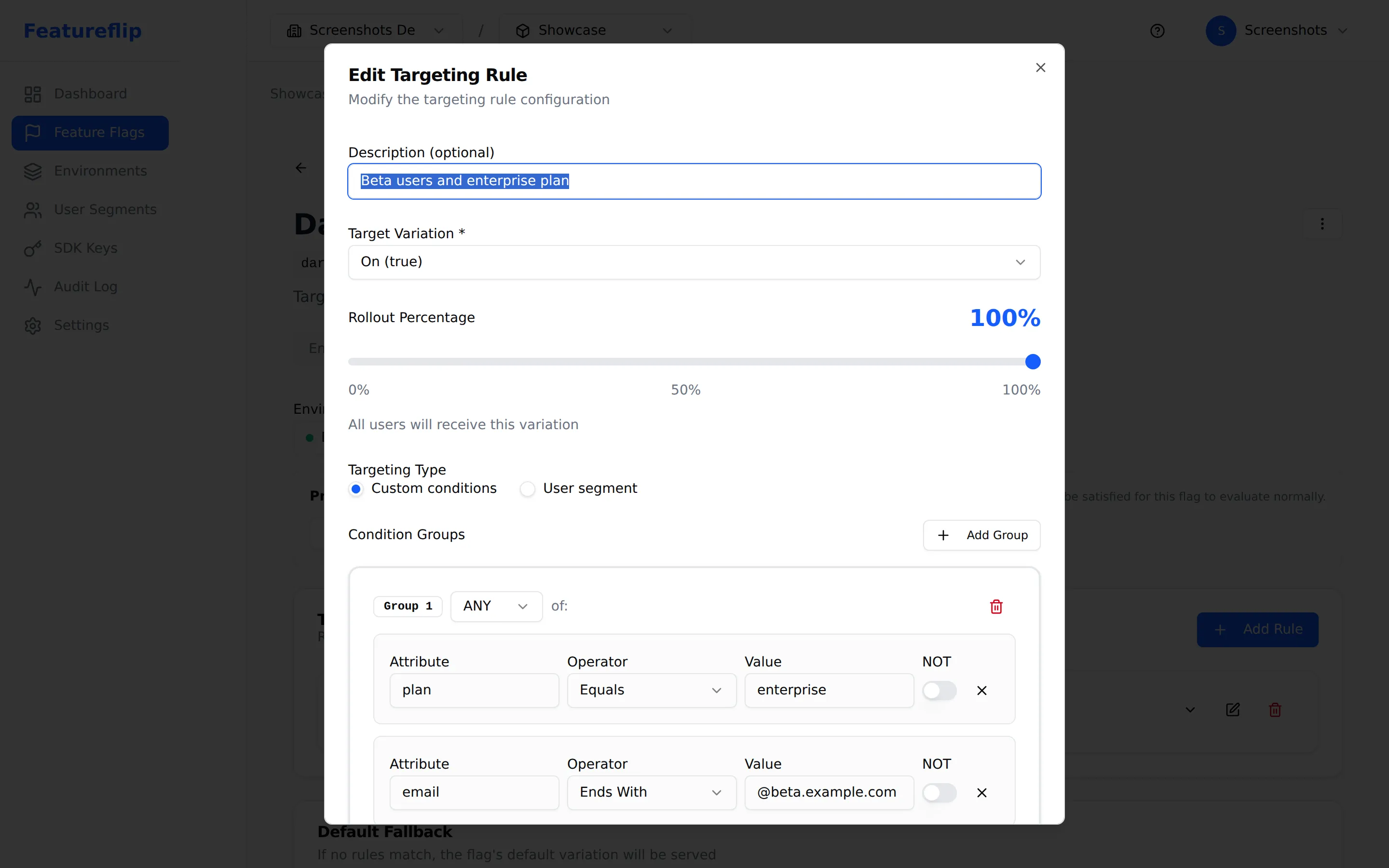
What it looks like in your app
The application passes the user, and any beta opt-in, in the evaluation context and asks the flag whether the beta is on for them. The last argument is the fallback, returned if the SDK cannot reach Featureflip, so the current experience doubles as the safe default:
const context = {
  user_id: 'user-456',
  org_id: 'org-123',
  beta: user.hasJoinedBeta, // opt-in stored in your app
};

// 'false' is the safe fallback: served when the user is not
// in the beta, or when the SDK can't reach Featureflip.
if (client.boolVariation('new-editor-beta', context, false)) {
  return renderNewEditor(context);
}
return renderCurrentEditor(context);
When you record which testers actually saw the beta, emit an exposure event so your analytics can segment behavior by cohort. The flag marks who was exposed; your analytics tool charts what they did:
// The flag decides access and records the exposure.
// Your analytics stack owns the funnels and retention.
if (client.boolVariation('new-editor-beta', context, false)) {
  analytics.track('beta_exposed', { feature: 'new-editor' });
}
The cohort rules live entirely in the dashboard. Widen new-editor-beta from a handful of design partners to everyone who opted in, or graduate it to on for all users, and every SDK reflects it on its next evaluation without a rebuild. Because the fallback is the current experience, an outage fails safe to the existing UI rather than exposing an unfinished feature. The same surface works in every language the platform supports, from Python and Go to C#, Java, and Node. Pick a quickstart from the SDK overview.
Beta access vs beta feedback
A flag covers the access side. A feedback or analytics tool covers the learning side. Knowing which one you need keeps you from asking a flag to do a research tool's job.
| Dimension | Beta access (a flag) | Beta feedback (research tools) |
|---|---|---|
| Question it answers | Who is in the beta, and what do they see? | What do beta users think, and how are they using it? |
| What it owns | The access decision and gradual expansion | Feedback capture, surveys, and product analytics |
| Source of truth | Reads the opt-in or segment you target | Owns the responses and the usage data |
| How it changes | Flip a rule or widen the cohort in the dashboard | Feedback flows in from testers over time |
| Right tool | A feature flag | A feedback, research, or analytics tool |
They compose. The flag is the switch that controls exposure inside your application, and the feedback tool owns the responses that come back. If all you need is to give a group early access and be able to pull it, a flag is the whole answer. If you also need to collect structured feedback and measure the cohort, pair the flag with a research or analytics tool and let the flag decide who is in the beta in front of it.
Common mistakes to avoid
The patterns that turn a clean beta into a mess. Most of them come from asking the flag to own something a feedback or analytics tool should.
Treating the flag as your feedback inbox
A flag decides who is in the beta; it does not collect what they think. Trying to track bug reports or survey answers by toggling flags means something else is doing the real work anyway. Let the flag gate access and pair it with a feedback or research tool that owns the responses, so each side does the job it is built for.
Non-sticky beta assignment
If a tester's inclusion is recomputed randomly on each request, they flip in and out of the beta between page loads, which makes their feedback meaningless. Assign the cohort with sticky bucketing so a user who is in the beta stays in it every time, until you explicitly change the rule.
Forgetting the safe default
The fallback passed to the evaluation is what the SDK returns if it cannot reach Featureflip. For a beta that value should be off, the current experience, so an outage never drops your whole user base into an unfinished feature. Default to off and let a matched rule opt a user into the beta, never the other way around.
Leaving the beta flag in place forever
Once a feature graduates and everyone has it, the beta flag is dead weight, an inventory item that carries a cost. Set the fallthrough to on, remove the now-redundant rule, and delete the flag. A permanent beta flag is exactly the kind of flag debt a cleanup routine exists to catch.
Hand-targeting a large beta one id at a time
Adding hundreds of individual user ids to a rule does not scale and turns every change into a chore. Define a segment for your beta cohort, or gate on an opt-in attribute your app sets, and manage membership through that instead. Reserve per-user targeting for the handful of named early testers.
When a flag-driven beta is the wrong tool
A flag makes early access easy, but it is not a research platform. A few cases call for something more:
- You need to collect and triage feedback. Surveys, in-app feedback widgets, and bug intake are a feedback or research tool's job. The flag gates access; it does not gather or organize what testers say. Run both and let each own its half.
- You need a public waitlist and signup funnel. Capturing interest, sending confirmation emails, and managing a queue belong to a marketing or CRM tool. A flag only gates the feature once a user is admitted; it does not run the funnel that gets them there.
- You want a statistically valid comparison. If the goal is to prove one variant beats another with significance rather than to gather early feedback, that is an experiment. See A/B testing with feature flags, where the flag delivers a sticky split and your analytics call the winner.
- You need deep analytics on the cohort. Funnels, retention curves, and session replay for beta users live in an analytics stack. The flag can emit an exposure event marking who saw the beta, but it does not model or chart their behavior.
Frequently asked questions
- Can I use feature flags for beta programs?
- Yes. A targeting rule that serves the beta variation to a cohort, whether that is a "Beta users" segment, accounts that opted in, or a few hand-picked testers, is a complete beta-access mechanism. Everyone outside the cohort falls through to the current experience, so the beta code can ship to production without exposing the feature. You expand the cohort, add early testers, or end the beta from the dashboard, with no deploy. The flag owns who is in the beta; your feedback and analytics tools own what testers think and how they use it.
- How do I let users opt into a beta?
- Add a "join the beta" control in your product that records the choice, then pass it as an attribute, for example beta: true, in the evaluation context alongside the user id you already send. A targeting rule serves the on variation when that attribute is set, and leaving the beta is the same in reverse. For a small curated beta you can skip the app-side storage entirely and manage the cohort as a segment or per-user targeting in the Featureflip dashboard.
- What is the difference between a feature flag and a beta feedback tool?
- A feature flag makes the access decision: who is in the beta and what they see. A feedback or research tool captures the other half: what testers think, the bugs they hit, and how they use the feature. The two compose. The flag is the switch that controls exposure inside your application, and the feedback tool owns the responses that come back. Many beta programs need only the access side, and a flag covers that completely; add a feedback tool when you want to gather and triage what testers tell you.
- How do I expand a beta gradually?
- Stack a percentage rollout under the cohort rule, or widen the segment that defines the beta. A percentage rollout uses sticky bucketing, so the testers already in the beta stay in as you raise the number, and new users are added in steps rather than all at once. That lets you start with a handful of accounts, watch how the feature holds up, and grow the cohort only when the signal looks healthy, all as dashboard changes rather than deploys.
- How do I end a beta or roll it back?
- To graduate the beta, set the flag's fallthrough to on so everyone gets the feature, then remove the now-redundant cohort rule and retire the flag. To roll back, flip the flag off: every connected SDK serves the fallback, and the whole cohort reverts to the current experience within a second or two over the stream, with no redeploy. Because the fallback is off, an outage also fails safe to the non-beta experience rather than exposing an unfinished feature.
- Can I run a private beta for specific customers?
- Yes. Target specific organization or user ids above the cohort rule so they match first and get the beta regardless of the broader opt-in. That gives a named design partner or a contracted customer early access without touching the rule everyone else falls through. Removing the override later is a dashboard change, and every SDK picks it up over the stream within a second or two.
Run your next beta behind a flag
The Free plan covers 10 flags and 2 environments. No credit card, no demo call: create a flag and target a beta cohort.
Related
User targeting & segments (docs)
Attributes, operators, and rule ordering: the mechanism a beta cohort is built on.
Progressive rollouts
Stack a percentage rollout under the cohort rule to widen the beta in steps as confidence grows.
A/B testing
When the beta is really an experiment: a sticky split with the winner decided in your analytics.
Targeted rollout
The glossary definition: releasing a feature to a specific cohort before a wider launch.