Progressive rollouts with feature flags
Start with 1% of users, watch the metrics, and expand once they look healthy. If they turn bad, roll back in seconds.
Last updated:
A progressive rollout exposes a new feature to a small slice of users first, commonly 1% or 5%, then expands the audience in stages once each tier shows healthy metrics. Feature flags make the percentage a configuration change instead of a redeploy: change the number in a dashboard, the SDK receives it over a streaming connection, the new path lights up for the configured share of traffic. The same users stay in the enabled cohort as you ramp, so you are not re-randomizing the population at every step. The point is to limit blast radius, get real production signal before broad exposure, and turn rollback into a 30-second operation instead of an incident.
Why ship features behind a progressive rollout?
Four reasons teams reach for a percentage gate before flipping a feature to everyone.
-
1
Limit blast radius
A bug in front of 1% of users is annoying, while the same bug in front of 100% is an outage. Progressive rollouts cap the exposure of any single change at a level you choose, so an unfortunate regression hits a small fraction of traffic instead of the whole product.
-
2
Real production signal
Staging environments do not have your real user mix, your real data shapes, or your real concurrency. Even a careful canary deploy can miss the long-tail behavior that only shows up at production scale. A 1% rollout in production exposes the new code path to actual users without committing the entire fleet.
-
3
Decouple deploy from release
When the rollout lives in a flag, you can deploy code that nobody is running yet. The deploy becomes a low-risk event: the binary is in place and the rollout starts when you decide. Marketing or product timing stops constraining the deploy cadence, and a Friday-afternoon merge stops being a scary one.
-
4
Rollback without a deploy
Flipping a flag is faster than reverting a commit and rebuilding the fleet. During an incident, "set the percentage to 0% and watch the error rate fall" is a 30-second operation. The new code is still in the binary, but no traffic executes it. The team can then triage the root cause without the clock running.
The standard rollout ladder
A pattern that works for most product changes: five steps, each gated on the previous step looking healthy. The numbers are starting points, so adjust for your traffic and risk profile.
| Step | What you are doing | What to watch |
|---|---|---|
| 1% | Smoke test in production | Crashes, error-rate spikes, anything obviously broken in the new code path. If 1% looks clean for a few hours, you have permission to grow the cohort. |
| 5% | Wider real-user mix | Latency at p95 and p99, error rates on the new code path versus the control. Five percent surfaces the long-tail user states that 1% misses: odd browsers, stale clients, paused subscriptions. |
| 25% | Cross-cohort signal | Conversion and business metrics that need volume to move (checkouts, sign-ups, retention proxies). At 25% you can A/B compare against the 75% control with statistical weight inside a working day. |
| 50% | Halfway, hold for a beat | Anything cyclical: daily peaks, end-of-month batch jobs, scheduled cron. Half the population means you can compare like-for-like across the cohort split when a regression turns out to be load-related. |
| 100% | General availability | The new path is the only path. Keep the flag in place for one full release cycle in case you need to flip it back, then archive it. Stale flags become invisible branches over time. |
A common variant pairs the percentage rollout with a targeting rule that serves the new path unconditionally to internal staff. Your team sees the feature at 100% from day one (dogfooding catches the obvious problems) while general users follow the ladder. This is the canary pattern composed with a percentage rollout.
How Featureflip handles progressive rollouts
The mechanics that make a rollout safe to ramp instead of a coin-flip at every step. For a closer look at the dial itself, see the percentage rollout feature.
- Sticky bucketing via deterministic hashing. Featureflip combines the user ID and the flag key into a hash that produces a stable bucket assignment. The same user always lands in the same bucket for the same flag, so growing the rollout adds users to the enabled cohort. It does not re-randomize the existing one. See the rollout strategies docs for the algorithm.
- Sub-millisecond local evaluation. The SDKs hold the flag config in memory and evaluate locally, with no network hop per request and no shared dependency on a flag service to keep the request path alive. Adding a flag to a hot code path does not add measurable latency.
- Server-Sent Events push. When you change a percentage in the dashboard, every connected SDK receives the new config over its open SSE connection within seconds. The next flag evaluation uses the new percentage, fleet-wide, with no redeploy. This is the propagation guarantee that makes "ramp by tenths of a percent" practical.
- Composable with targeting rules. A percentage rollout on the fallthrough is the default, but you can stack rules above it: internal staff get unconditional access, beta users get unconditional access, everyone else hits the percentage. See setting up targeting rules for the wiring.
- Built-in kill switch. Disable a flag entirely from the dashboard and every SDK serves the fallback variation within seconds. This is the incident-mitigation lever, separate from the percentage ramp, available at any step. See using a flag as a kill switch for the full pattern.
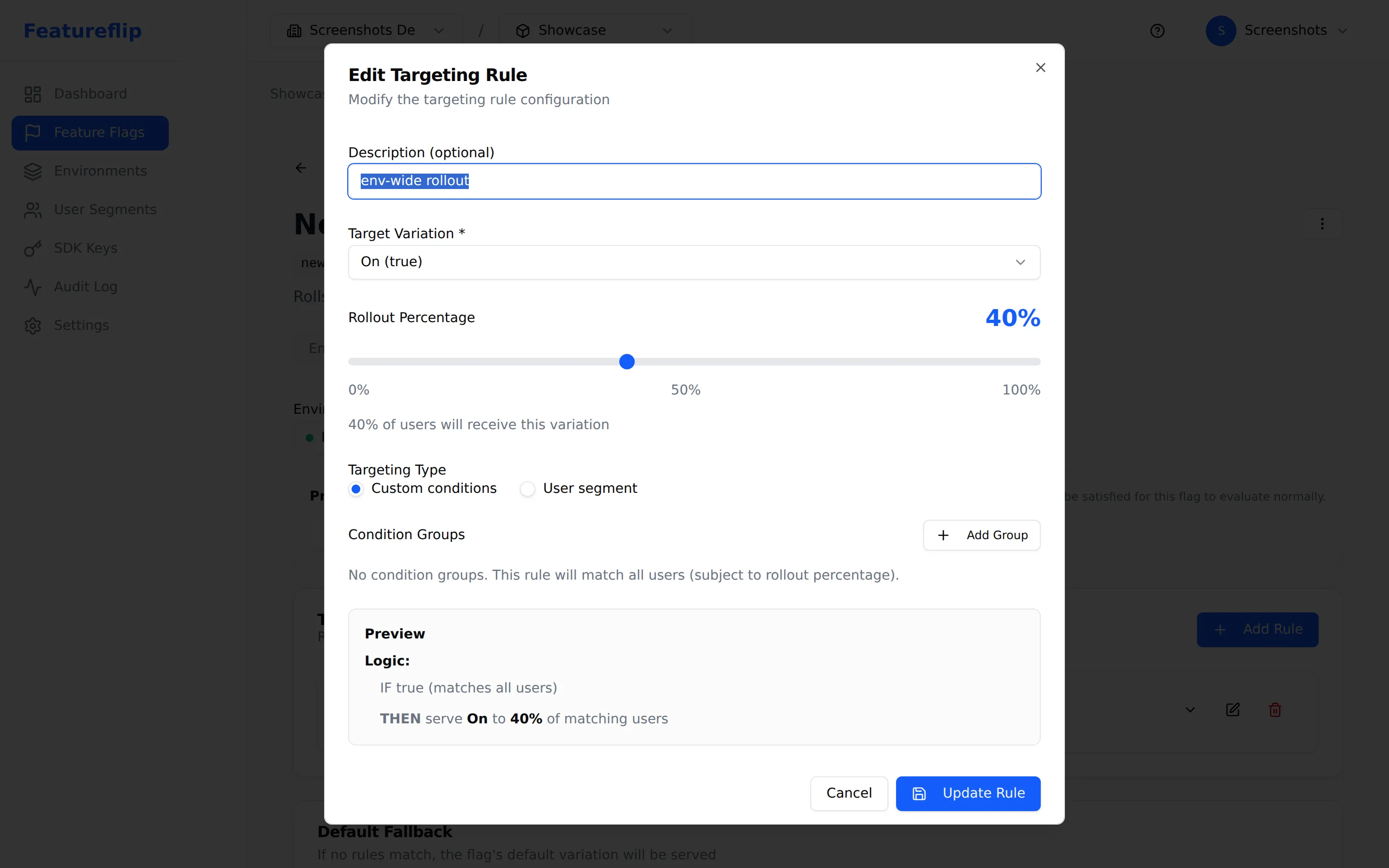
What it looks like in your app
The application code does not know it is in a rollout. It asks the SDK for the value of a flag, gets true or false, and branches accordingly:
if (client.evaluate('checkout-v2', user, false)) {
  return renderNewCheckout(user);
}
return renderLegacyCheckout(user);
The percentage lives entirely in the dashboard. At 0% every request gets false. At 5%, a stable 5% of authenticated users get true. The application code is identical at every step of the ladder. The same pattern works in every language the platform supports. Pick a quickstart from the SDK overview and the surface is consistent.
Common pitfalls to avoid
Patterns that show up in incident retros for teams that run rollouts.
Forgetting to pass user_id
Percentage rollouts use a deterministic hash of the user identifier plus the flag key. If the SDK gets called without a stable user_id, the hash falls through to the default branch every time, so every request from that caller sees the control variation. Server-side jobs and unauthenticated traffic are the likeliest offenders. Either pass a stable session ID or accept that anonymous traffic gets the fallthrough value.
Re-randomizing mid-rollout
If you change the targeting key between steps (say, switching from user_id to organization_id when you bump to 25%), every user gets rebucketed. People who saw the new feature at 5% suddenly do not, and vice versa. Pick one identifier per flag and keep it for the life of the rollout.
Skipping the cleanup step
Reaching 100% leaves one job undone. Once the feature is stable and the rollback window has passed, remove the flag from the code and archive it in the dashboard. Codebases that never delete flags end up with dozens of conditional branches that nobody dares to touch, and every refactor turns into archaeology.
Treating the rollout as the only safety net
A progressive rollout limits blast radius, and you still need something to detect the problem. Alerts, dashboards, and the discipline to actually watch them during a ramp are what catch issues at 1% so they never reach 100%.
Schema migrations behind a flag
Feature flags are great for application code, weaker for irreversible changes. A schema migration cannot be rolled back by flipping a flag, because the table is already altered. Stage migrations so the old and new shapes coexist for the duration of the rollout, then run a second migration to retire the old shape once the flag hits 100%.
When a progressive rollout is the wrong tool
Many product changes benefit from a percentage gate, and a few do not. Skip the ceremony when:
- The change is genuinely atomic. An API contract version, a wire-format upgrade, or a single-tenant cutover does not split cleanly across users. Use a maintenance window or a coordinated swap instead.
- The change is compliance-driven and must apply uniformly. A GDPR-mandated behavior change or a security patch cannot exclude 95% of users while you watch the other 5%. Ship to 100% and monitor.
- There is no per-user variability in what you are changing. Backend infrastructure swaps (a Redis upgrade, a queue migration) often have no per-user path. A canary deployment of the service is the better safety net.
- The change is too small to instrument. Cosmetic copy tweaks and trivial bugfixes do not earn the overhead of a ramp. Ship them, watch the broader release metrics, move on.
Frequently asked questions
- What is a progressive rollout?
- A progressive rollout exposes a new feature to a small percentage of users first (often 1% or 5%) and then expands the audience in steps once each tier shows healthy metrics. Feature flags make the percentage a configuration change instead of a redeploy: you change the percentage in a dashboard, the SDKs receive the new config, and the change takes effect within seconds. The same users stay in the enabled cohort as the percentage grows, so you do not re-randomize the population at every step.
- What percentage should I start a rollout at?
- Starting at 1% or 5% is common. The right floor is whichever is high enough to produce meaningful signal in your monitoring within a working day and low enough that an outage in the new path is annoying rather than incident-worthy. For a high-traffic consumer app, 1% may be thousands of users per minute, which is plenty of signal. For a low-volume B2B product, 5% or even 10% may be the practical floor.
- How is a progressive rollout different from a canary release?
- The two terms overlap. A canary release routes a small slice of traffic to a separate deployment (a "canary" instance) running the new code. You watch the canary, then either promote the build to the fleet or kill it. A progressive rollout uses a feature flag to gate the new code path inside a single deployment. The new code is already running everywhere, but only a configured percentage of users execute it. Progressive rollouts are cheaper to set up (no separate infrastructure) and more granular (you can split inside a single service), but they require the new code to be deployable before it is exposed.
- Will users flip between the new and old experience as the rollout grows?
- No, provided you keep the targeting key stable. Featureflip's SDKs use a deterministic hash of the user identifier and the flag key. The same user always produces the same bucket assignment for the same flag, so when you expand from 5% to 25% you are adding new users, not re-randomizing the original 5%. This is called sticky bucketing, and it is what makes progressive rollouts safe to compose with experiments.
- Can I run a progressive rollout without redeploying?
- Yes. That is the entire point of using a feature flag for rollouts. Deploy the new code with the flag at 0% (off for everyone). Once the deploy is healthy, change the percentage in the Featureflip dashboard. The SDK receives the new config over an SSE connection and applies it in-process within seconds. Rolling back is just as fast: set the percentage to 0% and the new code path stops executing on the next evaluation.
- How quickly does a percentage change propagate?
- Featureflip uses Server-Sent Events to push config changes from the dashboard to every connected SDK in real time. Propagation takes a second or two for SDKs with an open SSE connection. SDKs configured for polling pick up changes on the next poll interval. In an incident, this is the difference between a one-minute mitigation and a redeploy cycle.
Start your next rollout behind a flag
The Free plan covers 10 flags and 2 environments. No credit card, no demo call. Sign up and ship.
Related
Rollout strategies (docs)
Deterministic hashing, fallthrough behavior, and how rules combine with percentage splits.
What are feature flags?
The concept page covering flags, variations, environments, and the evaluation model.
Feature flag anti-patterns
The other side of the coin: common ways teams hurt themselves with flags, and how to avoid them.
Kill switches
The other end of the dial: cut a feature to zero instantly when a metric turns red mid-rollout.