Product feature
Feature flag lifecycle, from expiry date to removal
Every flag gets an end date and a person who answers for it. When it is finished, they hear about it, and the pull request that deletes it is already open.
Last updated:
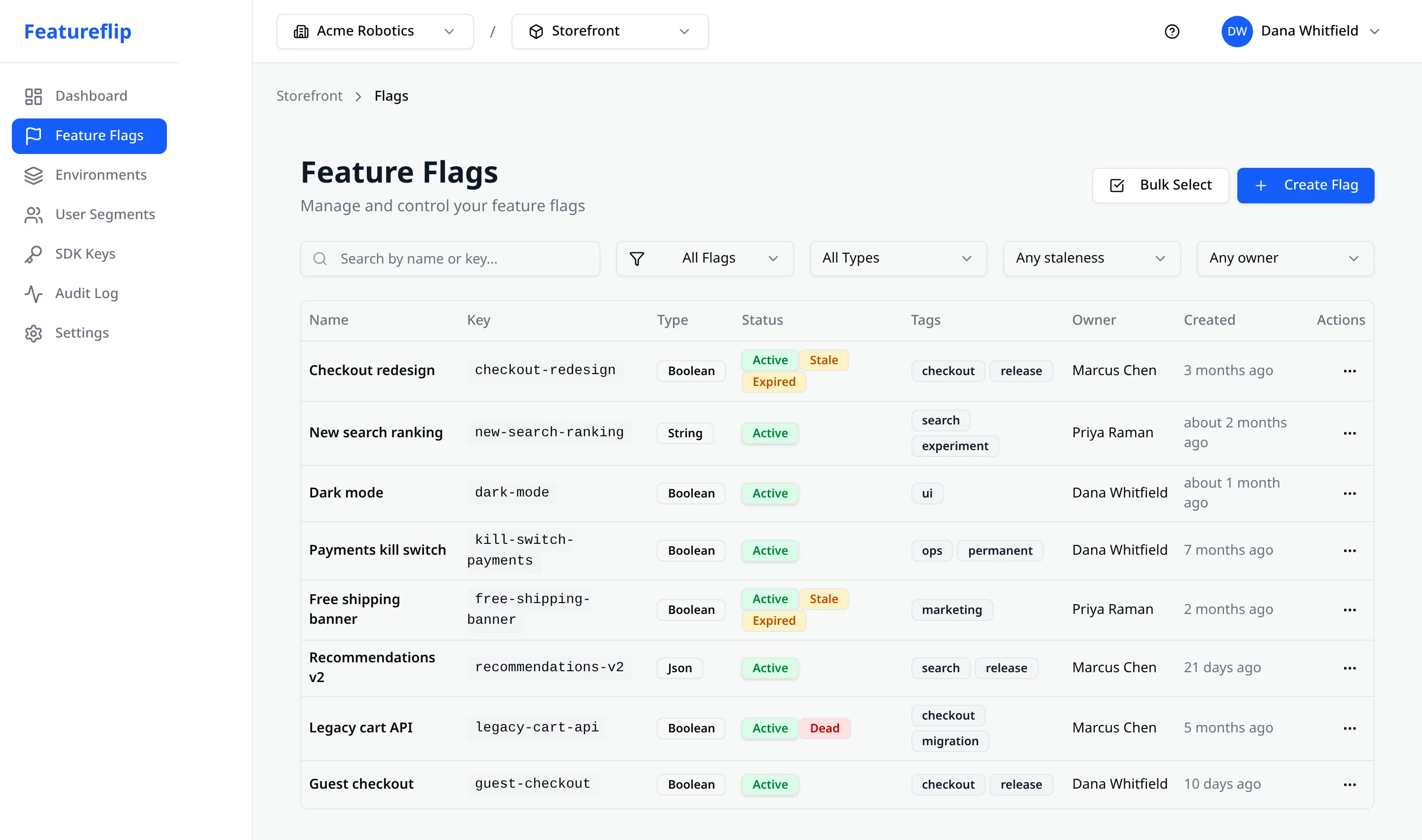
Featureflip manages a flag's whole life, so a temporary flag leaves your codebase once it has done its job. You give a flag an expiry date when you create it and, on Pro and above, an owner. Featureflip watches each flag's evaluation traffic every hour and marks it Stale or Dead when it stops deciding anything, or Expired once its date passes. On Team and above, the owner, or your admins if nobody owns it, gets one cleanup email. Then the flag cleanup GitHub Action opens a pull request that removes the code, and merging it archives the flag. Expiry dates, detection and the Action are on every plan, Free included.
What keeps a flag from outliving its purpose
A flag nobody removes is a branch your team reads, tests and debugs around for years. These six pieces make sure each one gets a decision.
An expiry date on the flag itself
Every plan
Most flags are meant to go away. Put the day you expect this one out on the flag when you create it, or later from its header. Once the date passes, the flag shows as Expired and joins the stale list. What it serves doesn't change, so a date nobody revisited can't take a feature down.
A named owner for every flag
Pro, Business and Enterprise
Pick the person responsible for a flag and the flags list shows them in a column of their own. Six months later, "who can tell me whether this is safe to delete" has an answer sitting on the flag itself, one click from the list.
A handover when someone leaves
Pro, Business and Enterprise
Removing a member who owns flags asks an admin who should inherit them. Their flags go to a teammate you choose, or stay unowned if you would rather sort them out later, and nothing silently points at a person who has left.
An email when a flag is done
Team, Pro, Business and Enterprise
When a flag passes its expiry date or goes dead, Featureflip sends a cleanup notice. On plans with owners it goes to the flag's owner. On Team, and for any flag nobody owns, it goes to your organization's Owners and Admins. Each flag shows up once, in that day's digest.
Detection from real traffic
Every plan
Every hour, Featureflip checks each flag in each environment for four traffic signals: fully rolled out, rolled back, no traffic, never used. A signal that holds for 30 days marks the flag Stale, and at 90 days it is Dead. A passed expiry date is the fifth reason, applied the moment the date goes by.
Removal by pull request
Every plan
The flag cleanup GitHub Action opens one reviewable pull request per dead flag and deletes the code path across thirteen languages with AST transforms and no LLM, so the same repository always produces the same diff. Merge it and the flag is archived.
The details live in the docs: expiry dates, flag owners, cleanup notices, stale flag detection and its five reasons, and the flag cleanup Action with its install workflow.
One flag, start to finish
Four steps take a flag from creation to deletion, and nobody has to keep a list. Below them is a flag of our own that went the whole way.
-
1
Create the flag with an end in mind
Fill in Expires on when you create the flag, and on Pro and above, name its owner. Both take a few seconds and they turn "temporary" from an intention into something the platform can check.
-
2
Ship it and ramp it
Roll the feature out the usual way, with a percentage rollout or targeting rules. The expiry date and owner sit quietly on the flag and change nothing about how it evaluates.
-
3
Featureflip notices it is finished
The expiry date passes, or traffic shows the flag has served one variation to nearly everyone for 90 days. It lands in the stale list, and the owner, or your admins, get one email naming it.
-
4
The removal arrives as a pull request
The cleanup Action opens a pull request that deletes the dead code path. You review it like any other change, merge it, and the flag is archived in Featureflip.
A real one: web-social-login
We run Featureflip on Featureflip. In June 2026 we put Sign in with Google on our own dashboard behind a flag called web-social-login and rolled it out to everyone. By September its traffic showed nothing but true, so detection marked it Dead with the reason StuckRolledOut. On September 4 the cleanup Action opened a pull request that kept the on branch and deleted the off branch.
The pull request also named five files that still mentioned the flag, among them our flag registry and two test files, and said to check them by hand. We did, in a second commit on the same branch. It merged on September 17, and Featureflip archived the flag about half a minute later.
That flag is older than expiry dates and owners. Created today, step 1 would put a date and a name on it from the start.
Built so cleanup can't break production
Every piece here puts a finished flag in front of a person and stops there. An expired flag keeps serving what it served yesterday. Detection never archives, disables or deletes a flag by itself. The one automated removal step, the cleanup Action, arrives as a pull request somebody reviews and merges.
- Dates alone never trigger a removal. A flag whose only stale reason is a passed expiry date doesn't qualify for a cleanup pull request until a traffic signal agrees, so a typo in a date can't make live code look dead.
- Permanent flags are allowed to stay. A kill switch serving one value for a year looks finished to traffic analysis. Mark it permanent and it drops out of stale reports, cleanup notices and removal pull requests, so the kill switch stays where it is without anyone being asked about it again.
- One notice per finished flag. A cleanup email reports a flag when it expires or goes dead and then goes quiet. Nobody gets the same reminder every morning.
- Every change is on the record. Setting, changing or clearing an expiry date or an owner is written to the audit log like any other edit. An owner entry names the old owner and the new one, and that includes the handover when an admin removes a member.
If you want the reasoning behind the whole loop, the blog walks through feature flag cleanup step by step, and how automated removal works covers the Action's rewrites in detail. Expiry dates, owners and cleanup emails arrived together, and the launch announcement walks through all three.
Frequently asked questions
- What is feature flag lifecycle management?
- It is the work of taking a flag from creation all the way to removal. In Featureflip that covers four things: an expiry date on the flag saying when it should come out, an owner responsible for it, stale-flag detection that notices from real traffic when a flag has stopped deciding anything, and a cleanup email plus a GitHub Action that opens the pull request removing it. Expiry dates, detection and the Action are on every plan, cleanup emails start on Team, and flag owners are on Pro and above.
- Does a flag stop working when its expiry date passes?
- No. The flag keeps serving exactly what it served the day before, with the same rules and the same rollout. An expiry date is a reminder: the flag is marked Expired, it joins the stale list with the reason PastExpiry, and on Team and above a cleanup notice goes out. If you want a flag to turn on or off at a set time, that is what scheduled changes are for.
- Who receives flag cleanup emails?
- Cleanup emails come with Team, Pro, Business and Enterprise. On Pro, Business and Enterprise, a flag's notice goes to its owner. A flag with no owner, or any flag in an organization on Team, goes to the organization's Owners and Admins. Free has no cleanup emails, though expired and dead flags still stand out in the flags list. Anyone can turn the emails off under Profile, Email Preferences, with the Flag cleanup notices switch, or with the unsubscribe link at the bottom of any notice.
- What happens to flag ownership if we upgrade to Pro later?
- Your flags arrive with owners already. On plans below Pro, Featureflip quietly records whoever created each flag as its owner, so when you upgrade the owner column is filled in rather than empty, and you only reassign the flags where the creator is the wrong person.
- Will an expired flag open a cleanup pull request on its own?
- No. A passed expiry date records intent, and intent is not proof that a flag has stopped mattering. The cleanup Action works from traffic-based removal candidates, so a flag whose only stale reason is PastExpiry waits until a traffic signal agrees.
- Can I set expiry dates from the API or an AI agent?
- Yes. The Management API has its own expiry endpoints, separate from the main flag update call, so tools that don't know about the field never clear a date by accident. The MCP server exposes a set_flag_expiry tool, and its find_stale_flags tool reports expired flags alongside the traffic-based ones.
Give your next flag an end date
Expiry dates, stale-flag detection and the cleanup Action come with every plan, including Free. Cleanup emails start on Team. Flag owners start on Pro, from $79/month billed annually.
Related
Flag expiration dates (guide)
Set, change or clear an expiry from the dashboard or the API, and what happens when it passes.
Stale flag detection (docs)
The five reasons a flag is marked Stale or Dead, per environment and hourly.
Flag cleanup Action (docs)
Install the GitHub Action that opens one pull request per dead flag and archives it on merge.
Scheduled changes (feature)
For a flag that should turn itself on or off at a set time.